An assistant on your website that knows what it is talking about
It answers from your own documents, understands what the visitor is looking for, records the request and hands off to your team when it should. In French and English.
Typical flow
The visitor asks a question
On your site, at any hour
The answer comes from your documents
Catalogue, policies, services
The request is qualified
And recorded for your team
A person takes over
When the question calls for it
- Your own documents
- Requests recorded
- A human handoff
- French and English
What your website does not do yet
Questions come in at night
Shipping, sizing, hours: the answer is somewhere on the site, but the visitor cannot find it.
The contact form keeps people waiting
The visitor writes, then waits for an answer that comes the next day, if they are still around.
Your team answers the same questions
The same questions come back every day, by email and by phone.
More than an FAQ that talks
Answers from your documents
Catalogue, policies, services, hours: it draws on what you give it.
Pins down the need
It works out what the visitor is looking for before answering or suggesting.
Records the request
Name, need, contact details: the request reaches you, ready to handle.
Hands off
When a question goes beyond what it knows, it points to your team.
Says no plainly
If your business cannot help, it says so instead of holding the visitor back.
French and English
It answers in the visitor's language.
Out loud, too
The same assistant can switch to voice in one click, like Emma on our own site.
Books, when it helps
Emma, on our site, books a consultation into our calendar herself.
Write to them
3 chatbots, one per trade, for fictional businesses. And Emma, at the bottom of this page, for ours.
Léa
Online store
Answers product questions, finds the right size and explains shipping and returns.
Try itSimon
Professional services
Understands the visitor's problem and tells them frankly whether the firm can help.
Try itNina
Restaurants
Gives the hours and the menu, and takes reservation requests.
Try itOpens playground.konectiz.com · No account needed
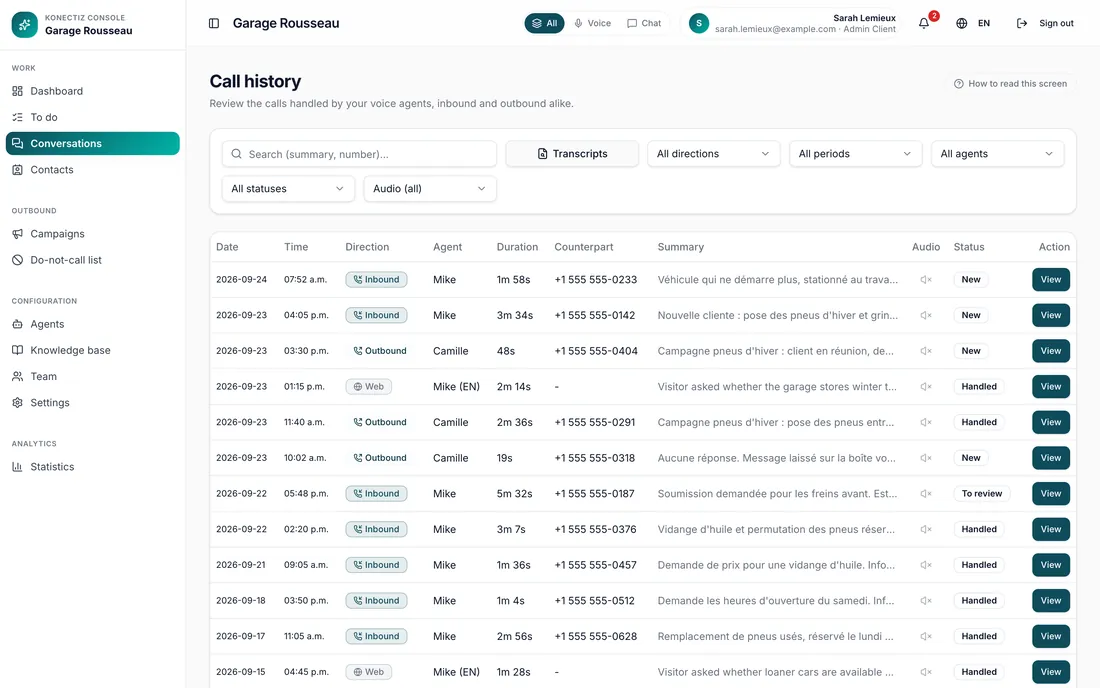
Written conversations, in the same console
Voice or text, every exchange lands in the same place, with its summary and transcript.
- A Voice, Chat or All filter
- Search that reaches into transcripts
- Requests to handle, sorted by urgency
What the chatbot will not do
Hold on to a visitor at all costs
If it is the wrong place, it says so. A plain no beats a pointless meeting.
Step outside its brief
You decide what it knows, how it sounds, and what it never says.
Block access to a person
When the question calls for it, it hands off to your team.
From your documents to your website
We gather your documents
What your customers ask, and where the answers live.
We set how it speaks
Its tone, what it says, what it never says, when it hands off.
We test it before your customers
Trick questions, off-topic requests, asking for a person: we push it to its limits.
It goes live on your site
A short code snippet, and it answers on every page.
Common questions
Where do its answers come from?
From your documents: catalogue, policies, service pages, frequently asked questions. We gather them with you before going live.
Can it get things wrong?
Like any assistant, yes. That is why we set what it never says, test it before your customers do, and keep every conversation readable in your console.
Does it also speak out loud?
It can. Emma, at the bottom of this page, starts in writing and switches to voice in one click. Our three playground demos are text only.
Do I need to rebuild my website?
No. It is added to your current site with a short code snippet.
Where do the requests it records go?
Into your console, and wherever you want them: a database, an email, a text to the team.
Let's talk about your website
What your visitors ask, and what you would like them to hear.