Your tools connected, with no double entry
A filled-in form becomes a record, an alert to the right person and an appointment, without anyone retyping anything. We build these automations, and we run them on infrastructure we operate.
Example: the form on this site
A form is submitted
On your site or elsewhere
The record is created
In your database, no retyping
The team is alerted
By text or messaging app
The request is routed
By page or service
- Your tools connected
- No retyping
- An alert on failure
- Infrastructure we operate
Where your team's time goes
The same information, typed three times
In the form, in the CRM, in the calendar. And every retyping is a chance to get it wrong.
The follow-ups that slip
A quote sent, a callback promised, an appointment to confirm: it all rests on someone's memory.
Numbers compiled by hand
Every week, someone gathers figures into a spreadsheet to see where things stand.
What already runs for us, every day
Appointments and reminders
Booking, confirmation, reminder, rescheduling.
Lead intake
Every form becomes a complete record, handed to the right person.
Request routing
By page, service or source, the request goes to the right place.
Texts and emails
Confirmations, follow-ups and check-ins, sent at the right moment.
Enrichment
Complete a record with what is public: website, sector, size.
Reports
The week's numbers, compiled and sent without anyone typing them.
Alerts
A notification to the right person when something needs their attention.
The link to your agents
What an agent says on the phone becomes a task, a record, a text.
Automation, inside every demo
There is no automation demo as such: there is one inside every agent. These three make it most visible.
Naomie
Appointment reminder
Calls to confirm a real appointment, and moves it to a real slot if you ask.
Try itCamille
Post-visit survey
One question, a score out of ten. What follows depends on the number: a link to leave a review, nothing at all, or an alert to the manager.
Try itJulien
Lead callback
Calls each new lead back, qualifies the need and books the meeting.
Try itOpens playground.konectiz.com · No account needed
What we actually connect to
Showing a logo proves nothing. Here are the tools our live automations use today - reads, writes, and failure handling included.
Calendar and booking
- Cal.com
Voice and telephony
- ElevenLabs
- Twilio
Data and records
- NocoDB
- Google Sheets
- ClickUp
Email and notifications
- Resend
- Instantly
- Telegram
Collection and enrichment
- Apify
Orchestration
- n8n
Your tool is not on the list? We check the API, its version, the permissions, and the actions you need before saying yes. An honest answer up front beats a bad surprise later.
Infrastructure we operate
Our orchestration, databases, and automations run on infrastructure we administer ourselves. No third-party platform between your workflows and us, and no quota ceiling set by someone else.
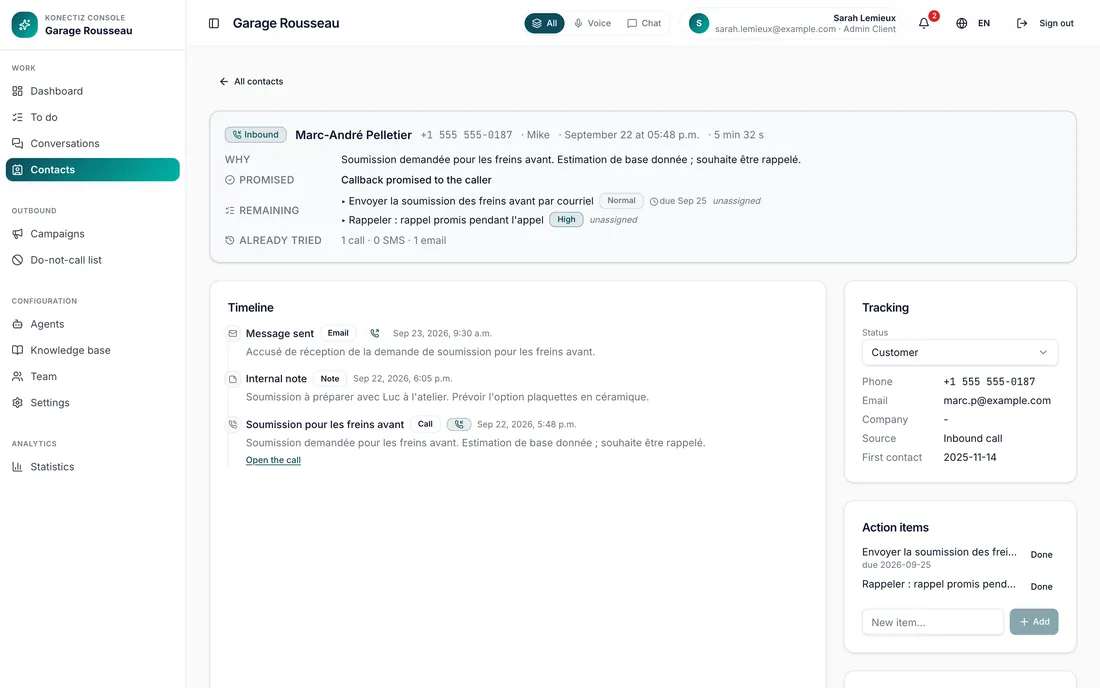
The record that fills itself in
Calls, messages and notes add themselves to the same timeline, with the source and the date of first contact. Nobody retypes them.
- One timeline per contact
- The source of every lead
- The action items still open
What we do not compromise on
No silent failures
When an automation fails, an alert goes to the right person.
An honest answer up front
Your tool is not on the list? We check its API and permissions before saying yes.
No third-party platform in between
Orchestration and databases run on infrastructure we administer.
One automation at a time
We map your workflows
Who enters what, where, and how many times.
We pick where to start
The one that frees up the most time for the least risk.
We build and test it
With your real tools, and a plan for every failure case.
We keep it running
On infrastructure we operate, with an alert if something breaks.
Common questions
Which tools can you connect?
The ones listed above already run in our live automations. For others, we check the API, the permissions and the actions needed before committing.
Where do the automations run?
On infrastructure we administer ourselves, not on a third-party platform with quotas set by someone else.
What happens if an automation fails?
An alert goes to the right person. And failure cases are planned for from the start: a tool that is down, missing data, a duplicate.
Do we need to change our tools?
No, that is the whole point: we connect the ones you already have. We will only suggest changing one if it truly cannot do the job.
Where should we start?
With whatever makes you retype the most. Often, that is incoming leads or appointment booking.
What are you retyping?
Describe a task that comes back every week. We will tell you whether it can be automated, and how.